

SpinBet Sign Up NZ: How to Join SpinBet New Zealand Step by Step
Joining SpinBet New Zealand takes a few minutes and one short form. This page walks through every screen of the SpinBet sign up using screenshots of the real registration and login pages, so you know exactly what you will be asked for before you start.
Tap Sign Up, choose a username, enter your email, a password and your mobile number (the +64 code is preset), add a referral code if a friend gave you one, confirm you are 18+ and accept the Terms and Conditions, then hit Next. You can also register with Google. SpinBet also needs your name, date of birth and residential address, and the welcome bonus is activated before your first deposit.
Who Is SpinBet?
SpinBet is an online casino and sportsbook that launched in 2023 and runs a dedicated site for New Zealand. Balances are kept in NZD, the casino lists more than 6,000 games from over 20 studios, and new accounts can collect up to $6,000 plus 100 free spins over their first three deposits. There is no app to install: SpinBet runs in the browser on phones, tablets and desktops, and live chat is open 24/7.
What You Need Before You Sign Up to SpinBet
- You are 18 or older. The sign-up form asks you to confirm it.
- An email address you can get into.
- A mobile number. The form opens on the +64 NZ code.
- Your full name, date of birth and residential address.
- A payment method in your own name. Third-party payments are not accepted.
- Photo ID and a proof of address, ready for verification.
SpinBet Sign Up: Step by Step
Step 1: Open SpinBet NZ and Tap Sign Up

Go to SpinBet’s New Zealand site on any device and tap the yellow Sign Up button in the top right corner. The Login button beside it is for players who already have an account. The homepage banner shows the welcome offer that kicks off with your first deposit: 100% up to $2,000 plus 100 free spins.
Step 2: Fill In the SpinBet Registration Form
The registration form opens on a single screen. Each number on the screenshot matches a note in the list.
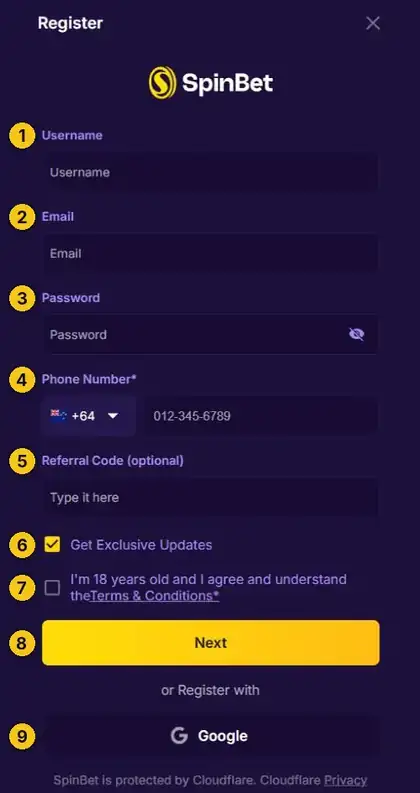
- UsernamePick the name you will log in with. Later on, the login screen accepts either your username or your email.
- EmailUse an address you check. It is also where a password reset goes.
- PasswordCreate your password and tap the eye icon to check what you typed. The login screen asks for at least 6 characters.
- Phone NumberThe country code is preset to +64 for New Zealand. Add the rest of your mobile number.
- Referral Code (optional)If a friend who plays at SpinBet gave you a code, enter it here. Otherwise leave it blank.
- Get Exclusive UpdatesTicked by default. Untick it if you would rather not receive SpinBet’s updates.
- 18+ and Terms and ConditionsRequired. This confirms you are at least 18 and agree to SpinBet’s Terms and Conditions.
- NextTakes you to the next part of the sign up.
- GooglePrefer to skip the form? Register with your Google account instead.
Step 3: Confirm You Are 18+ and Continue
Before the Next button does anything, the 18+ and Terms and Conditions box has to be ticked. It is worth opening the linked Terms and Conditions first, since they cover bonuses, deposits and withdrawals. Then press Next, or choose Google to register with your Google account.
Step 4: Add Your Personal Details
SpinBet also needs your full name, date of birth and residential address. Enter them exactly as they appear on your ID and payment method. SpinBet does not accept third-party payments, and it checks your documents before your first withdrawal, so details that match from the start save time later.
Step 5: Activate the Welcome Bonus, Then Deposit
Once your account is open, go to the Rewards section and activate the welcome bonus before you make your first deposit. Deposit $20 or more and SpinBet matches it dollar for dollar, up to $2,000, with 100 free spins on top. Deposits two and three are topped up by 50% and 75%, again up to $2,000 each. New players can deposit from $15 on their first three deposits, but those smaller deposits never carry a bonus.
Full terms are on the SpinBet sign up bonus page, and the first deposit guide covers payment methods.
Step 6: Verify Your SpinBet Account
No withdrawal is released until your account is verified. SpinBet usually asks for photo ID, a document showing your address and proof that your payment method is yours. Uploading them on day one means your first cash out is not held up. The SpinBet verification guide explains each document.
Logging In to SpinBet After You Sign Up
From then on, the Login button opens this screen. Here is what each part does:
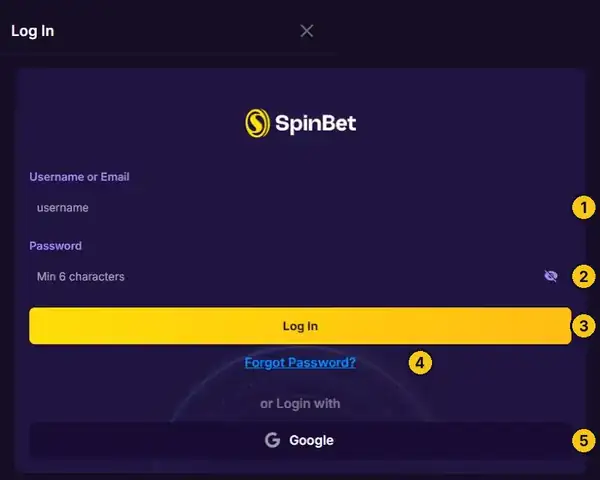
- Username or EmailEither one works.
- PasswordAt least 6 characters. The eye icon shows what you typed.
- Log InOpens your account.
- Forgot Password?Starts a reset using your email address.
- GoogleLog in with Google if you registered that way.
Having trouble getting in? The SpinBet login guide covers every device, and the password reset guide walks through the Forgot Password screen.
SpinBet Sign Up and Login Guides
SpinBet Sign Up Mistakes to Avoid
Try SpinBet Pokies Before You Sign Up
Not sure yet? Spin a few free demos first. These run on play credits, so nothing is at stake. The full SpinBet pokies catalogue has many more.
Free SpinBet pokie demos
Free demo
Ready to join SpinBet New Zealand? Claim up to $6,000 + 100 free spinsNew players only. Min. deposit $20. 40x wagering. T&Cs apply.
Sign Up Now »